JuiceFS 在 K8S 上的部署一般通过打包镜像的方式,这与目前 JuiceFS 在集群的部署方式有关。当前 JuiceFS 使用的是 CSI 存储卷的方式,这也是 JuiceFS 官方推荐的部署方式之一。
这里首先需要对 CSI 有一定的了解。
背景介绍 CSI 介绍
CSI (Container Storage Interface) 是一个行业标准规范,它定义了一套标准的接口,让任何存储系统(如云硬盘、本地存储、网络文件系统等)都能以统一的方式接入到容器编排系统(如 Kubernetes)中。
CSI 最大的作用就是将存储驱动的逻辑从 K8S 的核心代码中分离出来,成为 K8S 的插件,避免每次增加存储驱动都必须重新开发 K8S。
CSI 通过一套基于 gRPC 的 API 规范来实现分离。一个完整的 CSI 驱动通常由两部分组成:
Controller Plugin
Node Plugin
CSI 的核心优势在于:
解耦和独立发展 :存储厂商可以独立于 Kubernetes 发布、更新和修复他们的驱动程序,大大加快了迭代速度。
增强的稳定性和安全性 :驱动代码运行在独立的 Pod 中,其崩溃不会影响 Kubernetes 核心组件。
易于扩展 :任何存储厂商只要遵循 CSI 规范,就可以轻松编写自己的驱动,并被 Kubernetes 使用。
功能标准化 :CSI 不仅支持基本的挂载,还标准化了快照、卷克隆、卷扩容、拓扑感知(将 Pod 调度到离存储更近的节点)等高级功能。
更多 CSI 细节和相关信息可以参考 https://github.com/container-storage-interface/spec/blob/master/spec.md
JuiceFS CSI Driver 官方文档链接:https://juicefs.com/docs/zh/csi/introduction/
JuiceFS 为了兼容 K8S 部署,开发了 JuiceFS CSI Dirver,用于 JuiceFS Pod 的编排调度。在 K8S 下,JuiceFS 可以用持久卷(PersistentVolume)的形式提供给 Pod 使用。
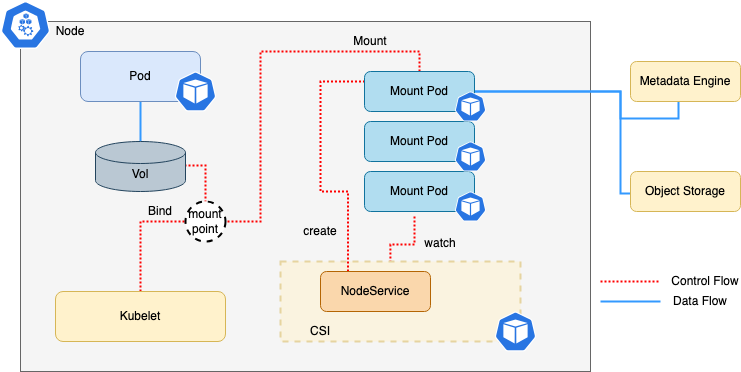
JuiceFS CSI 默认使用的是 Mount Pod 的形式,让 JuiceFS 客户端运行于独立的 Pod 之中,并且由 CSI Node Service 来管理 Mount Pod 的生命周期。其架构如下:
更多的信息可以参考以下链接:
JuiceFS Mount Pod 的 Smoke Test 在 K8S 中,Pod 的创建需要依赖相应的 yaml 文件,通过 kubectl create -f smoke-pod.yaml 进行创建。验证 JuiceFS 需要首先打包 JuiceFS 镜像。
镜像构建 构筑镜像的 Dockerfile 可以参考:
1
2
3
4
5
6
7
8
9
10
11
12
13
14
FROM xxx/juicedata/build-base:with-tls AS builderWORKDIR /build COPY . . RUN cp -r /assets/tls ./tls RUN make juicefs.linux FROM xxx/juicedata/run -base:latest COPY --from=builder /build/juicefs /usr/local/bin/ RUN rm -rf /bin/mount.juicefs && ln -s /usr/local/bin/juicefs /bin/mount.juicefs && /usr/local/bin/juicefs --version
随后使用 docker build 来构建镜像:
1 docker build -t juicefs-pod-test-image -f mount.Dockerfile .
K8S Pod 构建 在完成镜像的构建之后,需要编写用于 Pod 创建的 yaml 文件:
1
2
3
4
5
6
7
8
9
10
11
12
13
14
15
16
17
18
19
20
21
22
23
24
25
26
27
28
29
30
31
32
33
34
35
36
37
38
39
40
41
42
43
44
45
46
47
48
49
50
51
52
53
54
55
56
57
58
59
60
61
62
63
64
65
66
67
68
69
70
71
72
73
74
75
76
77
78
79
80
81
82
83
84
85
86
87
88
89
90
91
92
93
94
95
96
97
98
99
100
101
102
103
104
105
106
107
108
apiVersion: v1 kind: Pod metadata: name: smoke-juicefs-pod namespace: juicefs-system spec: terminationGracePeriodSeconds: 60 tolerations: - operator: "Exists" containers: - name: smoke-juicefs-pod image: xxx/juicedata/mount:ce-v1.3.0 resources: requests: memory: "10Ki" cpu: "1m" limits: memory: "1Gi" cpu: "1000m" command : - "/bin/bash" args: - "-c" - | set -e echo "Starting JuiceFS mount verification..." if ! mountpoint -q /jfs; then echo "ERROR: /jfs is not mounted" exit 1 fi echo "JuiceFS mounted successfully at /jfs" TEST_FILE="/jfs/smoke-test-$(date +%s) .txt" echo "Testing write operations..." echo "JuiceFS smoke test - $(date) " > "$TEST_FILE " echo "Testing read operations..." if cat "$TEST_FILE " | grep -q "JuiceFS smoke test" ; then echo "Read/Write test passed" else echo "ERROR: Read/Write test failed" exit 1 fi rm -f "$TEST_FILE " echo "Cleanup completed" echo "All tests passed. Keeping container alive..." while true ; do sleep 60 echo "JuiceFS mount status: $(mountpoint /jfs && echo 'OK' || echo 'FAILED') " done livenessProbe: exec : command : - "/bin/bash" - "-c" - "mountpoint -q /jfs && echo 'JuiceFS mount is healthy'" initialDelaySeconds: 30 periodSeconds: 60 timeoutSeconds: 10 failureThreshold: 3 readinessProbe: exec : command : - "/bin/bash" - "-c" - "mountpoint -q /jfs && touch /jfs/.readiness-test && rm -f /jfs/.readiness-test" initialDelaySeconds: 10 periodSeconds: 30 timeoutSeconds: 5 failureThreshold: 2 lifecycle: preStop: exec : command : - "/bin/bash" - "-c" - | exec 1>/proc/1/fd/1 2>/proc/1/fd/2 echo "=== [PRESTOP] Starting graceful shutdown and umount verification..." TEST_FILE="/jfs/shutdown-test-$(date +%s) .txt" echo "=== [PRESTOP] Pre-shutdown test - $(date) " > "$TEST_FILE " || echo "=== [PRESTOP] Warning: Cannot write to JuiceFS during shutdown" sleep 5 rm -f "$TEST_FILE " || echo "=== [PRESTOP] Warning: Cannot clean test file" sync echo "=== [PRESTOP] Graceful shutdown preparation completed" echo "=== [PRESTOP] Note: Actual umount will be handled by Kubernetes/CSI driver" volumeMounts: - mountPath: /etc/updatedb.conf name: updatedb-config readOnly: true subPath: updatedb.conf - mountPath: /jfs name: songlin-test-pvc volumes: - configMap: defaultMode: 420 name: updatedb-config name: updatedb-config - name: songlin-test-pvc persistentVolumeClaim: claimName: songlin-test-pvc
这个 yaml 文件用于测试 APP 能否正常启动,JuiceFS 能否在其中正常挂载和读写,以及 APP 能否被正常回收。
然后可以在 K8S 中执行指令创建 Pod:
1 kubectl create -f smoke-pod.yaml
完成 Pod 的创建之后,可以观察到这个 Pod 已经被创建。
1
2
3
> kubectl get pod smoke-juicefs-pod -n juicefs-system -o wide NAME READY STATUS RESTARTS AGE IP NODE smoke-juicefs-pod 1/1 Running 0 18m 10.120.51.223 svr28176de740
查看 Pod logs 我们创建 Pod 之后立即在另一个命令行中执行命令 kubectl logs smoke-juicefs-pod -n juicefs-sysstem --follow,然后可以观察 Pod 的 logs 输出。
为了观察到正常删除回收的 logs,我们可以在看到 logs 打印出 OK 之后,执行命令 kubectl delete pod smoke-juicefs-pod -n juicefs-system 删除这个 pod,可以继续观察 logs:
1
2
3
4
5
6
7
8
9
10
11
12
13
14
15
> kubectl logs smoke-juicefs-pod -n juicefs-sysstem --follow Starting JuiceFS mount verification... JuiceFS mounted successfully at /jfs Testing write operations... Testing read operations... Read/Write test passed Cleanup completed All tests passed. Keeping container alive... JuiceFS mount status: /jfs is a mountpoint OK [PRESTOP] Starting graceful shutdown and umount verification... [PRESTOP] Graceful shutdown preparation completed [PRESTOP] Note: Actual umount will be handled by Kubernetes/CSI driver JuiceFS mount status: /jfs is a mountpoint OK
此时似乎已经完成了验证,但其实并没有。回顾一下我们前文提到过的 JuiceFS CSI Driver,提到过一句话:
JuiceFS CSI 默认使用的是 Mount Pod 的形式,让 JuiceFS 客户端运行于独立的 Pod 之中,并且由 CSI Node Service 来管理 Mount Pod 的生命周期。
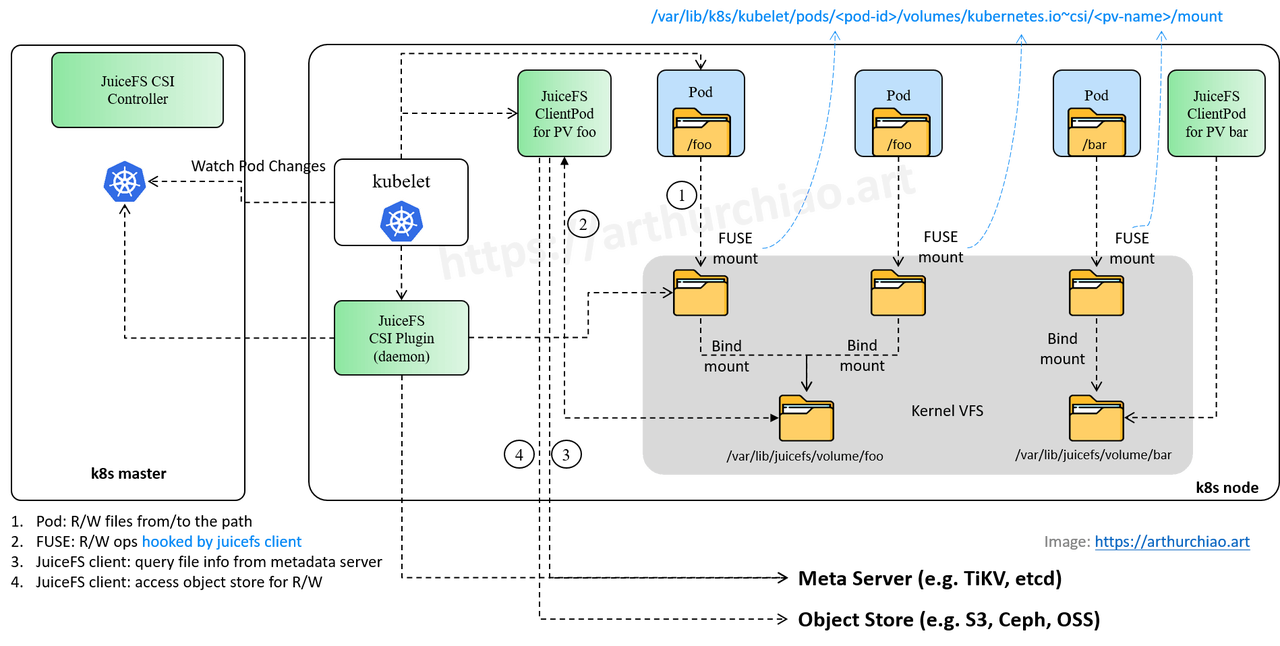
如果去检查 APP Pod ,我们确实可以看到 JuiceFS 的版本号与我们构建的一致,但这个 JuiceFS 并没有被使用。APP 真正使用的 JuiceFS 客户端其实是在与 APP Pod 绑定的 Mount Pod 中,我们可以称这个 Pod 为 Client Pod。在 图解 JuiceFS CSI 工作流:K8s 创建带 PV 的 Pod 时,背后发生了什么 的一张图可以很好地解释到底发生了什么。
可以看到,APP Pod 其实并不会直接读写 volume,而是通过 FUSE 把读写命令发送到 Client Pod 上,Client Pod 对文件执行读写,将结果返回给 APP Pod。
因此,在 APP Pod 的 logs 虽然已经打印了正确的输出,但此时使用的依然是过去的 JuiceFS,并不能说明我们编译并且构建的 JuiceFS 新版本的客户端是正常的。
修改 Configmap 想测试 JuiceFS 需要让 Client Pod 中的镜像使用我们构建的版本,需要修改 Configmap 的 ceMountImage。这个参数决定了 CSI 使用什么版本的镜像构建 Client Pod,也就是我们创建的真正的 Mount Pod。
可以查看一下当前的 Comfigmap:
1
2
3
4
5
6
7
8
> kubectl get cm -n juicefs-system NAME DATA AGE istio-ca-root-cert 1 3y194d juicefs-csi-driver-config 1 388d juicefs-csi-driver-config-km94mfbt82 1 407d kube-root-ca.crt 1 526d mount.juicefs.com 0 407d updatedb-config 1 134d
我们需要修改的是 juicefs-csi-driver-config 这个 Comfigmap:
1
2
3
4
5
6
7
8
9
10
11
12
13
14
15
16
17
18
19
20
21
22
23
24
25
26
27
28
29
30
31
32
33
34
35
> kubectl get cm juicefs- csi- driver- config - n juicefs- system - o yamlapiVersion: v1 data: config.yaml: "enableNodeSelector: true\nmountPodPatch:\n - ceMountImage: juicedata/mount:ce-v1.2.0\n \ hostNetwork: false\n annotations:\n juicefs-clean-cache: true\n cluster-autoscaler.kubernetes.io/safe-to-evict: true\n resources:\n requests:\n cpu: 10m\n memory: 16Mi\n \ limits:\n cpu: 10000m\n memory: 10240Mi\n mountOptions:\n \ - cache-size=10G\n - cache-dir=/var/lib/k8s/jfsCache\n env:\n - name: BEACON_METRIC_TAG_BU\n value: SYS\n - name: BEACON_METRIC_ENDPOINT_PROMETHEUS_BEACON\n \ value: http://:9567/metrics\n - name: BEACON_METRIC_ENDPOINT_IP\n valueFrom:\n \ fieldRef:\n apiVersion: v1\n fieldPath: status.podIP\n \ - name: CDOS_POD_IP\n valueFrom:\n fieldRef:\n apiVersion: v1\n fieldPath: status.podIP\n - name: CDOS_POD_NAME\n valueFrom:\n \ fieldRef:\n apiVersion: v1\n fieldPath: metadata.name\n \ - name: CDOS_POD_NS\n valueFrom:\n fieldRef:\n apiVersion: v1\n fieldPath: metadata.namespace\n - pvcSelector:\n matchLabels:\n \ juicefs-performance-mode: seqread\n mountOptions:\n - cache-size=0G\n \ - buffer-size=2G\n - max-readahead=512M\n resources:\n requests:\n \ cpu: 10m\n memory: 16Mi\n limits:\n cpu: 10000m\n memory: 10240Mi\n - pvcSelector:\n matchLabels:\n juicefs-performance-mode: work-dir\n mountOptions:\n - cache-size=20G\n - buffer-size=2G\n \ - cache-partial-only=true\n - cache-dir=/var/lib/k8s/jfsCache\n - entry-cache=300\n - attr-cache=300\n - open-cache=300\n - writeback=true\n \ - max-uploads=100\n - free-space-ratio=0.1 \n annotations:\n juicefs-delete-delay: 30m\n juicefs-clean-cache: true" kind: ConfigMap metadata: annotations: kubectl.kubernetes.io/ last - applied- configuration: | {"apiVersion":"v1","data":{"config.yaml":"enableNodeSelector: true\nmountPodPatch:\n - ceMountImage: juicedata/mount:ce-v1.3.0\n hostNetwork: false\n annotations:\n juicefs-clean-cache: true\n cluster-autoscaler.kubernetes.io/safe-to-evict: true\n resources:\n requests:\n cpu: 10m\n memory: 16Mi\n limits:\n cpu: 10000m\n memory: 10240Mi\n mountOptions:\n - cache-size=10G\n - cache-dir=/var/lib/k8s/jfsCache\n env:\n - name: BEACON_METRIC_TAG_BU\n value: SYS\n - name: BEACON_METRIC_ENDPOINT_PROMETHEUS_BEACON\n value: http://:9567/metrics\n - name: BEACON_METRIC_ENDPOINT_IP\n valueFrom:\n fieldRef:\n apiVersion: v1\n fieldPath: status.podIP\n - name: CDOS_POD_IP\n valueFrom:\n fieldRef:\n apiVersion: v1\n fieldPath: status.podIP\n - name: CDOS_POD_NAME\n valueFrom:\n fieldRef:\n apiVersion: v1\n fieldPath: metadata.name\n - name: CDOS_POD_NS\n valueFrom:\n fieldRef:\n apiVersion: v1\n fieldPath: metadata.namespace\n - pvcSelector:\n matchLabels:\n juicefs-performance-mode: seqread\n mountOptions:\n - cache-size=0G\n - buffer-size=2G\n - max-readahead=512M\n resources:\n requests:\n cpu: 10m\n memory: 16Mi\n limits:\n cpu: 10000m\n memory: 10240Mi\n - pvcSelector:\n matchLabels:\n juicefs-performance-mode: work-dir\n mountOptions:\n - cache-size=20G\n - buffer-size=2G\n - cache-partial-only=true\n - cache-dir=/var/lib/k8s/jfsCache\n - entry-cache=300\n - attr-cache=300\n - open-cache=300\n - writeback=true\n - max-uploads=100\n - free-space-ratio=0.1 \n annotations:\n juicefs-delete-delay: 30m\n juicefs-clean-cache: true"},"kind":"ConfigMap","metadata":{"annotations":{},"name":"juicefs-csi-driver-config","namespace":"juicefs-system"}} creationTimestamp: "2024-08-13T03:23:17Z" name: juicefs- csi- driver- config namespace: juicefs- system resourceVersion: "16911116973" uid: 733 a1bbe-7531 -4 f21- bf40-7885 a1dee072
可以看到这里有 ceMountImage 这个参数。将后面的 Image 换成我们构建好的。
最终测试 然后,将我们之前创建的 Somke Pod 删除,重新构建。继续观察一下 Pod 的 logs。如果我们编译的 JuiceFS 没有问题,应该和上面的 logs 一样。
我们继续验证一下,此时 Mount Pod 的 Image 版本已经是新构建的。
1
2
3
4
5
6
7
8
9
10
11
12
13
14
15
16
17
18
19
20
21
22
23
24
25
> kubectl get pod_smoke-juicefs-pod -n juicefs-system -o jsconpath='{.spec.nodeName}' svr28176de740% > kubectl get pods -n juicefs-system -l app.kubernetes.i/name=juicefs-mount NAME READY STATUS RESTARTS AGE juicefs-svr17175hp360-pv-juicefs-fat-infer-ai-model-artifacts-vetuuz 1/1 Running 0 12d juicefs-svr17475in5112-pv-juicefs-fat-infer-ai-model-artifacts-bellrx 1/1 Running 0 5d1h juicefs-svr25209de740-pv-juicefs-fat-infer-ai-modelartifacts-xgfgd 1/1 Running 0 25d juicefs-svr25209de740-pv-juicefs-uat-infer-ai-model-artifacts-dbuthw 1/1 Running 0 35d juicefs-svr28176de740-pv-juicefs-fat-infer-ai-model-artifacts-sufihu 1/1 Running 0 42d juicefs-svr28176de740-songlin-test-pv-wslvif 1/1 Running 0 6m20s juicefs-svr28176de740-songlin-test-pv-yorllp 1/1 Running 0 118m juicefs-svr30185hw1288-pv-juicefs-fat-infer-ai-model-artifacts-pnnyuk 1/1 Running 0 56m juicefs-svr30186hw1288-pv-juicefs-fat-infer-ai-model-artifacts-vjblfv 1/1 Running 0 28d juicefs-svr30393in5212-pv-juicefs-fat-infer-ai-model-artifacts-rqbryg 1/1 Running 0 42d juicefs-svr30987hc4900-pv-juicefs-fat-infer-ai-model-artifacts-vaohdo 1/1 Running 0 40d juicefs-svr8174hp360-pv-juicefs-fat-infer-ai-model-artifacts-wiwsyt 1/1 Running 0 49d juicefs-svr9165hp360-juicefs-pv-zmctest-csi 1/1 Running 0 532d > kubectl get pod juicefs-svr28176de740-songlin-test-pv-wslvif -n juicefs-system -o wide NAME READY STATUS RESTARTS AGE IP NODE juicefs-svr28176de740-songlin-test-pv-wslvif 1/1 Running 0 6m27s 10.120.51.221 svr28176de740 > kubectl get pod juicefs-svr28176de740-songlin-test-pv-wslvif -n juicefs-system -o jsonpath='{.spec.containers[*].image}' juicedata/mount:ce-v1.3.0%
可以看到,此时 APP Pod 对应的 Mount Pod 的镜像版本已经是最新版本。





.jpeg)